
Adjust personal detailsUpdated 2 months ago
Scenario Overview
Due to the integration from our previous email marketing channel to Klaviyo, some customer names may have been incorrectly adjusted in the system.
If a customer contacts us stating that the name we are using is incorrect, we will follow the process below to correct it.
Step-by-Step Process
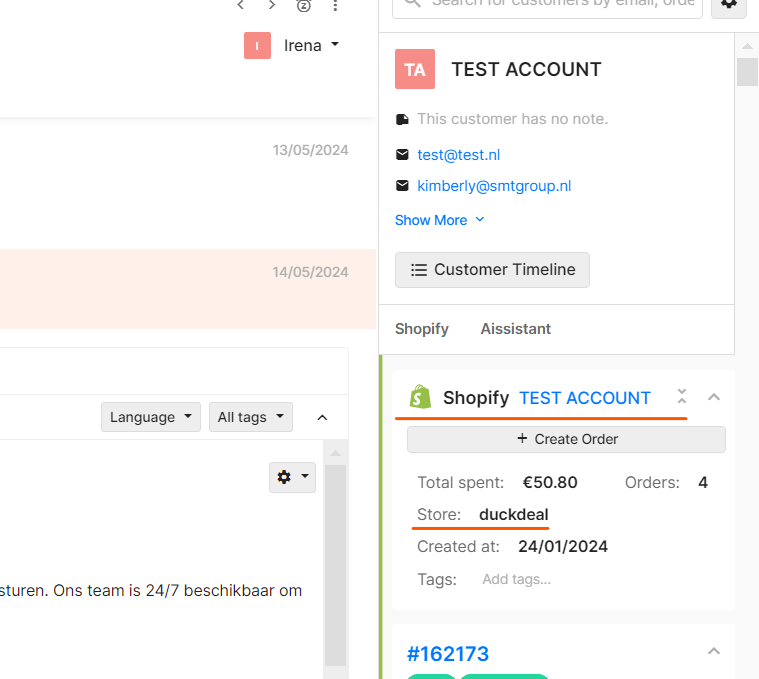
1. Access the Customer Account in Shopify
Open the Shopify admin panel for the shop the customer contacted.
Click on the name of the customer (or the incorrect name shown). You will be directed to their account.
2. Update the Customer's Name
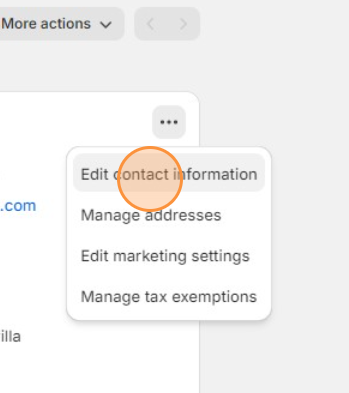
In the customer's account, locate the name field.
Edit the name to reflect the correct details provided by the customer.
Save the changes.
3. Notify Team Members
Tag your customer service manager in the internal communication tool.
Provide the following details:
Incorrect name: [Old Name]
Correct name: [New Name]
your customer service manager will double-check that the update has been applied correctly in Klaviyo.
ad a tag to the ticket with 'Marijn internal'.
 (Marijn is not here anymore so you cannot tag him anymore, but you can continue using his tag to keep track of these issues as this will make sure it ends up in a backup folder)