Communication via supplier in GorgiasUpdated 2 months ago
All Aftersell cases with the supplier listed in the problem sheet can be handled via Gorgias, including redesigns and example requests. Refunds for the supplier will still be processed in the Aftersell sheet.
Don’t forget to remove the "supplier" tag once the supplier has responded to keep everything organized for the supplier!
If you need to tag the supplier for a review case, make sure the tag of the shop is added to the ticket! Otherwise it is not visible for the supplier.
The supplier will see the ticket due to the tag of the store and the tag supplier, so make sure these 2 tags are always correct in the tickets.
Problem sheet updates can be communicated via Gorgias. For example, if address details are missing, a parcel needs to be picked up, or any other issue mentioned in the problem sheet, you should inform the customer. When the customer replies, you can update the supplier via an internal note in Gorgias.
If you do this, write "informed in Gorgias" in the problem sheet to keep track of actions taken.
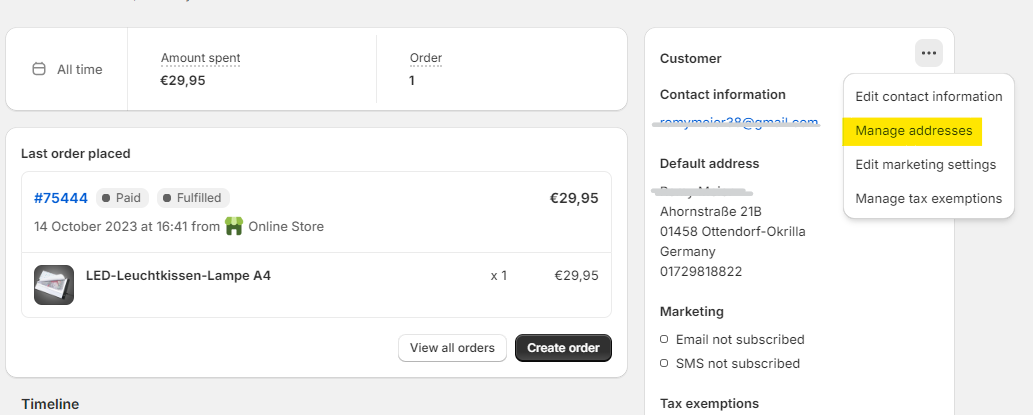
IMPORTANT: When updating a customer’s address, make sure to adjust it not only in the order but also in the customer’s profile. This helps prevent future issues. To do this, go to the customer’s main profile and select "Manage addresses."