
Facebook GroupsUpdated 2 months ago
Managing Private Facebook Groups
Some shops have private Facebook groups that require consistent management. This involves handling membership requests, pending posts, and moderation alerts to maintain a safe and positive environment for the community.
Accessing Facebook Groups
Log in to the Facebook Account
Switch to Your Assigned Shop Profile
- Click on the profile picture in the top-right corner.
- Select "See All Profiles" and choose the shop(s) you work for.
- Important note: Some groups are handled directly from 'rick' his account, so also check groups when you are in rick's account
Navigate to the Group Management Page
- On the left-hand menu, click Groups.
- Under "Groups You Manage", select the group of your shop.
Key Responsibilities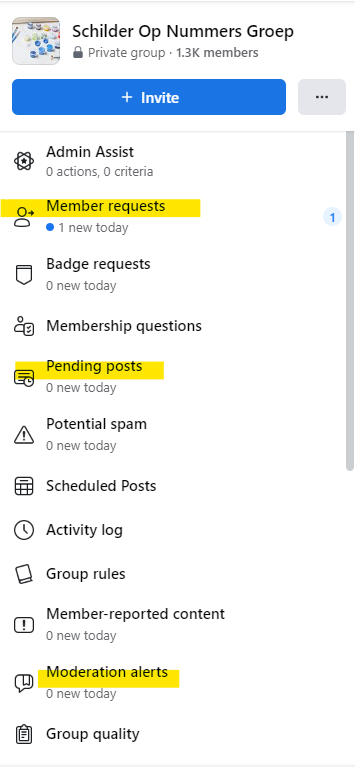
1. Membership Requests
- Approve or reject group membership requests based on the following criteria:
- Reject accounts that look suspicious (e.g., no photos, not living in the relevant country, or fake profiles).
- Approve only genuine accounts that appear to belong to potential customers or fans.
2. Pending Posts
- Approve posts if they meet the following conditions:
- Photos of Diamond paintings with our logo (or a partner shop’s logo). So no Chinese logo's etc
- Photos where the logo is not visible but are relevant (e.g., framed paintings).
- Posts that do not contain:
- Negative messages.
- Promotion of other diamond painting webshops or groups.
- Personal customer details (e.g., addresses).
- Reject posts that fail to meet these standards.
3. Moderation Alerts
- Handle alerts triggered by flagged words or phrases.
- Remove posts in 99% of cases where:
- Another store or webshop is mentioned.
- The content violates group guidelines.
Facebook Group Details by Shop
Important Notes
- Always prioritize maintaining a positive community atmosphere.
- Reject suspicious requests/posts to protect the group’s integrity.
- Escalate unusual or repeated violations to a supervisor if necessary.