
No order foundUpdated 2 months ago
A customer contacts us regarding an order they made with us, the customer doesn't have any order number and no info is found in Gorgias linked to their email address.
1. Search with the email address in Shopify
Copy the email address and paste it in Shopify in the shop account where the customer sends us with, try deleting everything after the @ to see if something pops up.
Some people have for example a Gmail and Hotmail account and text us with their Hotmail but ordered with Gmail and vice versa.
Found the order?
You can now fill out the order number in Gorgias and merge the customer to the order.
Not found?
2. Search with the name of the customer
If the name of the customer is known, try to search in Shopify with the name of the customer.
Found the order?
You can now fill out the order number in Gorgias and merge the customer to the order.
Not found?
3. Ask more info
When you really don't find any order, we will need to request more information from the customer.
We can ask for address details and search in Shopify with the address details, but the best thing you can ask for is a screenshot of their bank statement.
Mail template to use => Order not found
Important is that we need to see on this bank statement:
- The date and time of the transaction
- the amount
- the receiver
For Klarna you will need:
- the full invoice (the invoice they receive from Klarna)
- you will use the number that looks like 'Rrshr3hr485kGrhtFirT' (a combination of capital/small letters and numbers- see screenshot)
- Fill this code out in Shopify and you should find the order
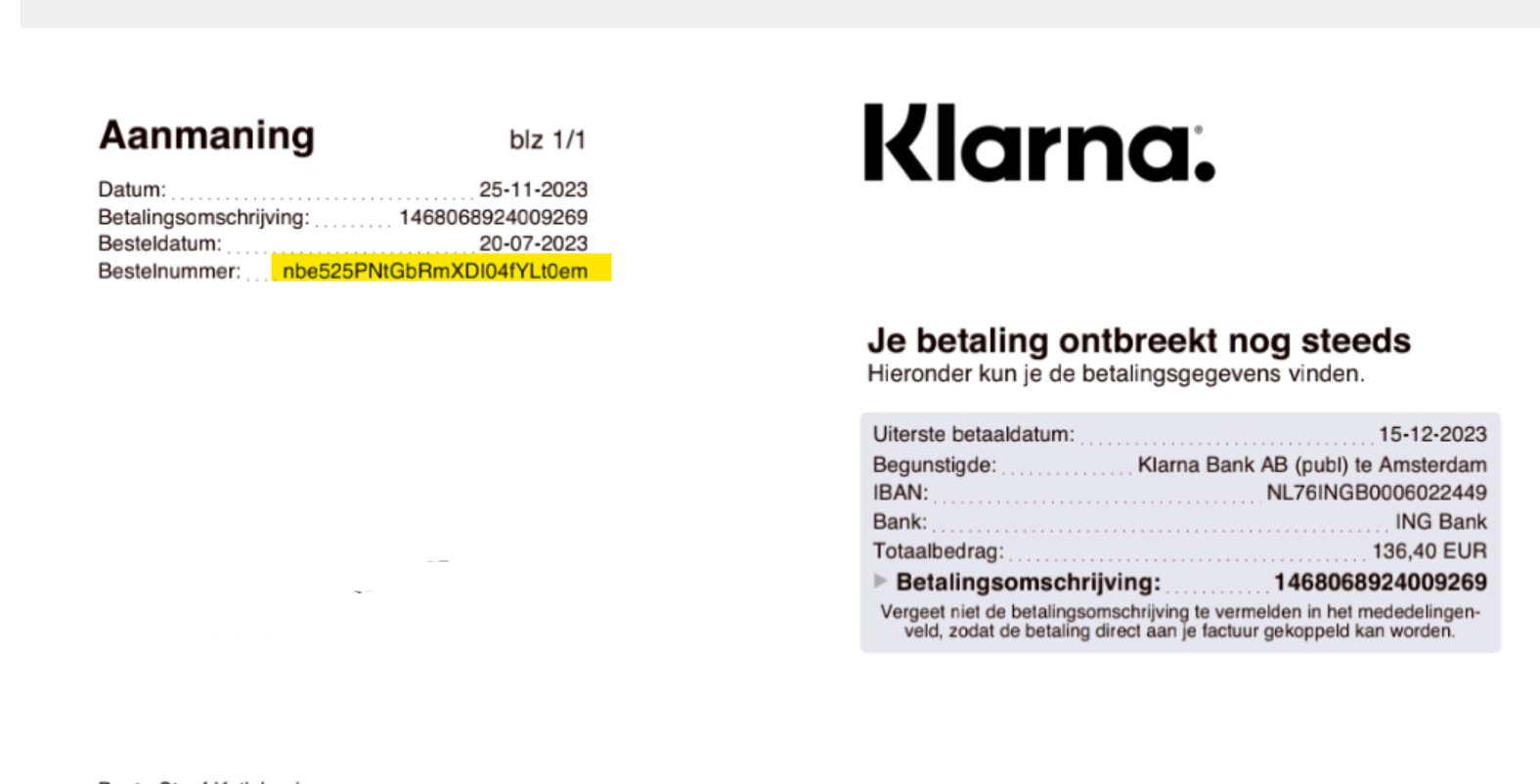
For example:
This is a bank statement of a Dutch customer, the yellow parts are what we can search with within Shopify and the Green part is the name of the receiver, as you can see this is a payment that was made to another shop, not one of our shops.
In this case, we will inform that the customer did not order from us.
Another example:
This is a bank statement of one of our shops, de diamond painter.
With this information, we can search the order within Shopify.
You can go to Shopify and click on 'orders':
Next you will click on the magnifier glass and select the option'add filter' and select 'date' and select the option 'custom' and select the date that is written on the bank statement both on the starting and ending date:
Now you have a view of all orders placed on that date, now you can check the hour the order was supposedly placed and the amount, and then you should be able to find the order.
Example, the above statement was paid on 29-12-2022, 17.20h and an amount of 29,95 euro:
Here we have our order:
You can now fill out the order number in Gorgias and merge the customer to the order.
4. You don't find any order and the customer doesn't have a statement?
Inform the customer that we cannot find back an order without any information.
Ask if it was ordered with another name?
If they have any order number or email confirmation?
Are they sure they ordered with us?
If we cannot find anything, firstly tag your customer service manager, so she can take a look into it.
If we still cannot find anything, there isn't a lot we can do unfortunately