
Shipping - Using 17TRACK for Internal Shipment TrackingUpdated 2 months ago
What is 17TRACK?
17TRACK is a universal tracking platform that supports hundreds of carriers worldwide. It can be especially helpful for internal use when tracking international parcels or when the webshop tracking page shows limited information.
✅ When to Use 17TRACK
The webshop tracking page isn't updating or doesn't show full tracking history
The parcel was shipped with a lesser-known carrier
You want to quickly cross-check tracking from multiple carriers in one place
You're helping a customer but want to confirm the latest logistics info first
🔄 How to Find the Local Carrier Tracking
To check the local delivery carrier’s tracking page:
Open the tracking on 17TRACK.
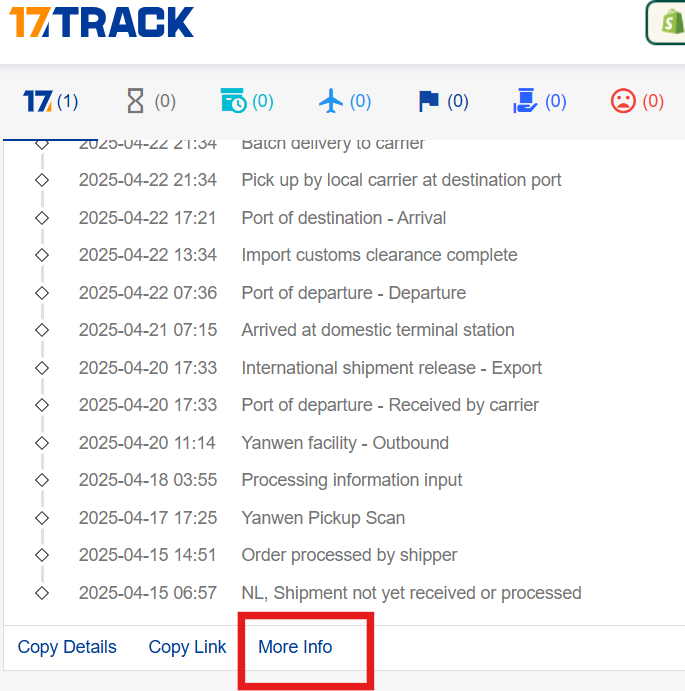
Scroll down to the bottom of the tracking page.
Tap “More info”.
A pop-up will open showing carrier details and:
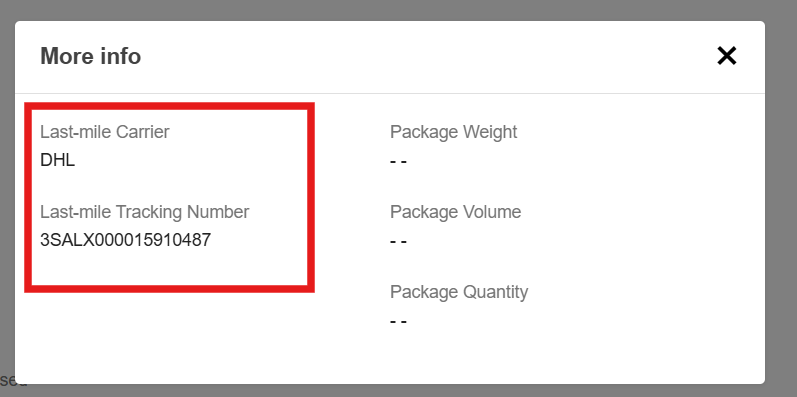
This is especially useful when a parcel has reached the destination country and is handled by a local postal service (e.g., Posti, PostNord, bpost, etc.).
🔧 Tip: Add Carrier Manually If Tracking Doesn’t Show Anything
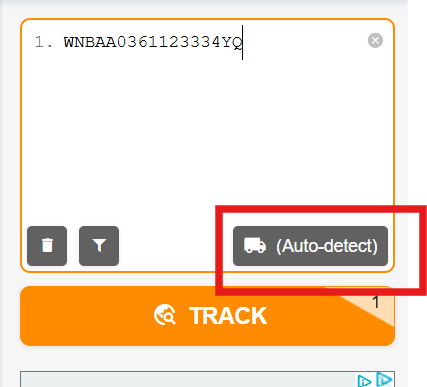
Sometimes 17TRACK doesn't recognize the tracking number automatically. If this happens, you can manually add the carrier to help identify the shipment.
Example:
If the tracking number is from Wan Express, you can search and select WJDGJ Express manually from the carrier list.
This can help bring up full tracking data when automatic detection fails.
⚠️ Important: Do Not Share 17TRACK Link with Customers
While 17TRACK is a useful internal tool, we do not recommend sharing its link directly with customers. Here's why:
The interface and information may confuse customers
It often includes carrier details or status messages that are unclear or cause unnecessary worry
The webshop tracking page or Parcel App offers a more user-friendly experience tailored to their order
✅ Instead, provide customers with:
The tracking link on our webshop
The local carrier tracking (inform this will be active once delivered in their country)