
Translations 📚Updated 2 months ago
Translation Assignment
Translation Channel:
All translation requests will be communicated through the Slack channel "Translations."
Details provided in the channel include:
Required languages.
Deadline for submission.
Tracking Time:
Track your translation time in Hubstaff under the project "Translation."
Daily Check:
Make it a habit to check the "Translations" channel every day to avoid missing any tasks. This is very important!
Assigned Translators
| Language | Primary Translator | Backup Translator |
|---|---|---|
| Norwegian | Maria | Katja |
| German | Giny | Katja |
| Dutch | Georgina | Nikki |
| English | Giny | Katja |
| Swedish | Maria | Katja |
| Finnish | Katja | Linda |
| French | Contact Marck or Lynn (via WhatsApp) |
Translation Workflow
Step 1: Use ChatGPT for Translation
Open ChatGPT (in a browser or app).

Start a new chat.

Write a clear prompt for the translation. Example:
"Translate the following text from [source language] to [target language] in informal form.: [insert text here]."
Paste the text that needs translation into the prompt.
Tip: Instruct ChatGPT not to use bold fonts for words unless necessary.
Specify words that should not be translated (e.g., Header, Subheader, Name, etc.).
Step 2: Review the Translation
Check for the following:
Words that do not fit in context.
Errors or grammatical mistakes.
Untranslated words (ensure there are no Dutch words left).
Make corrections as needed.
Step 3: Finalize and Format the Document
Copy and paste the translated text into the relevant document (Microsoft Word or Google Doc).
Adjust the formatting to match the source file:
Spacing: Ensure it matches the original document.
Font: Apply bold or colored formatting where applicable.
Structure: Maintain alignment (e.g., centered text in the source file should also be centered in the translation).
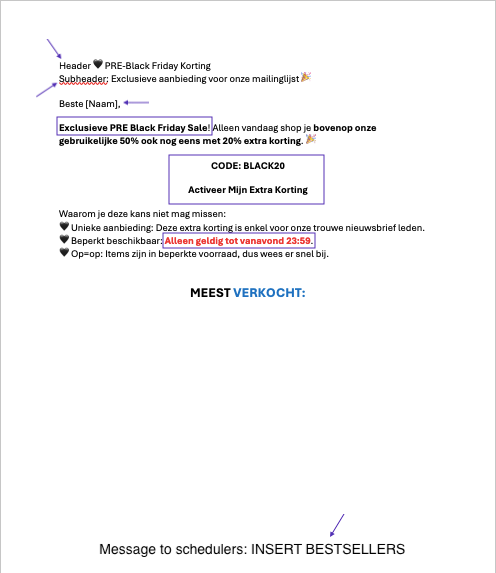
Reinsert any non-translated English words (e.g., Header, Subheader, Name, Message to the schedulers) in their correct positions.
Step 4: Product-Specific Translations
Verify Product Names:
For emails mentioning specific products, double-check the exact product name in the relevant shop. Use the translated product title from the website.
Example:
The Dutch title "Vrolijke peperkoekman" should be translated as "Glad peberkagemand" in Danish. Check the shop link to confirm the title: Example.
Inconsistent Product Titles:
If the product title on the website is incorrect, contact Ursina or Katja to correct it.
Key Notes
Always use the same ChatGPT session for consecutive translations (no need to start a new chat).
Ensure the translated document reflects the original file's structure and formatting.
For any questions or issues, reach out to the relevant backup translator or team lead.