
Systems we use 💻Updated 2 months ago
Gorgias
Gorgias is the system we use to answer our mails and manage our social media channels. This will be one of the mail tools you will be using, so a clear understanding of the tool is very important.
HERE you will find a video of a quick overview of how Gorgias works.
Once you have received your login details per email you will be able to log in on Gorgias via https://:.gorgias.com/login
Shopify
Shopify is the ecommerce platform we use to receive and process our Orders. It is a very easy tool to use, and we don't usually use shopify that often anymore as it is integrated into Gorgias, but for some things it is still the only way to go, such as looking up an order on time and date, searching orders that have issues in aftersell, etc...
HERE you find a video explaining of all you need to know about Shopify.
Password you will find here once you got acces
Problem sheet
This is a sheet where the supplier will write down problems that occur with an order such as wrong or incomplete addresses, missing pictures, shipping problems, …
You will need to contact the customer concerning these problems and update the supplier via internal notes in Gorgias. You can also mark that it is done in the problem sheet.
If no communication with customer is needed, fill out directly in problem sheet.
Problem sheet (this is for missing address details, sold out items etc):
- Order number: Here the supplier fills out the order number
- Problem type: Here the supplier will select the problem type
- Problem: Here the supplier will fill in the problem that occured
- Informed customer: Here the customer service agents checks the box once they informed the customer
- Address: If not updated in Gorgias-we will fill out the address details here (for example, if the address details were found in Shopify and the customer does not need to be contacted)
- Handled by supplier: Here the supplier will check the box if this request has been handled and no further action is needed (once the supplier selects this the line should automatically go away)
- Picture: here the supplier will put a picture if needed
- Comment cs: If anything needs to be communicated to supplier, customer service agent will do it here
- Comment supplier: If anything needs to be communicated to customer service agent, supplier will do it here
Photo issues (anything related to uploaded pictures not being the right size etc):
- Order number: Here the supplier fills out the order number
- Problem type: Here the supplier will select the problem type
- Problem: Here the supplier will fill in the problem that occured
- Informed customer: Here the customer service agents checks the box once they informed the customer
- Picture: here the supplier will put a picture if needed
- Handled by supplier: Here the supplier will check the box if this request has been handled and no further action is needed (once the supplier selects this the line should automatically go away)
- Comment cs: If anything needs to be communicated to supplier, customer service agent will do it here
- Comment supplier: If anything needs to be communicated to customer service agent, supplier will do it here
In case a customer forgot to add a picture to their painting, you send an email requesting the picture. Once you received the picture, you will tag a supplier in internal note in Gorgias, attaching this picture. Same for a customer who wants a redesign or a design/sizing info of an own picture, you can tag supplier in internal note in Gorgias.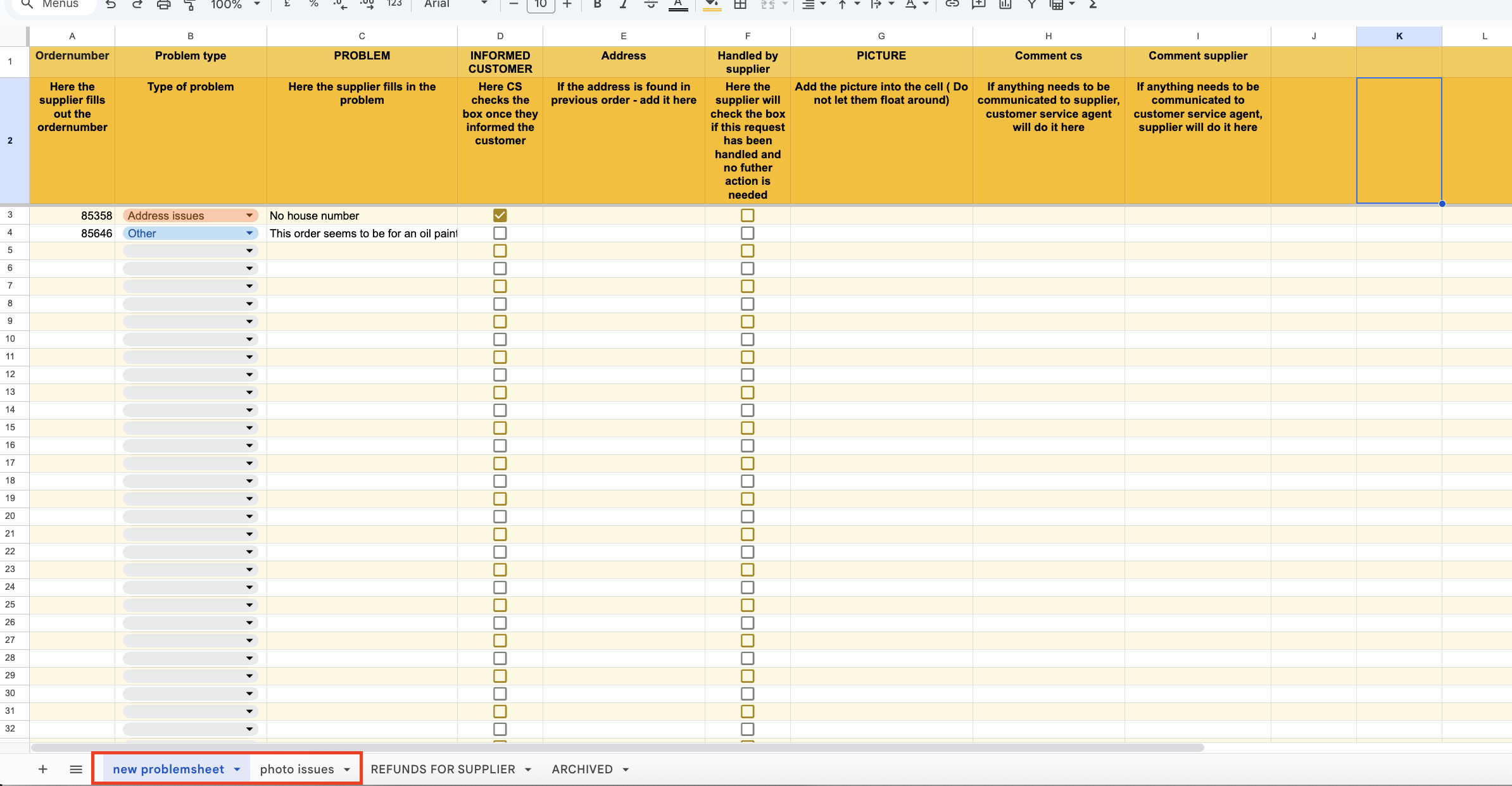
Here you find all problem sheets
Excel files:
Also in this file you will find one more tab called 'refunds for supplier' is meant to put in the refunds for orders. That way, we will get a refund from our supplier if it is an issue from his side. Examples we put in this sheet:
- An order came return to us due to shipping exceptions and customer doesn't want a reshipment
- damaged item and customer doesn't want a reshipment, an order that was never shipped
- unhappy with the quality and don't want a reshipment
- lost parcel and no reship wanted
- ...
NEVER fill this out without having written confirmation from Natalie or Katja (handles refunds).
The only things we fill out here are the first 4 columns. In the first row, we write down the order number. Second row, we write down what the issue is. In the third row we write down the date and in the last row we write down the amount that needs to be refunded. Always ask the customer if they want a reshipment and never mention a refund, only if they ask themselves we will proceed with a refund.
Slack
We use Slack as our primary communication channel. It’s an efficient and user-friendly platform that allows for seamless collaboration, instant messaging, and quick updates within the team. Whether you need to share files, ask questions, or coordinate tasks, Slack keeps everyone connected and informed.
Slack Channels
- CS-questions & ideas: In this chat you can ask all your questions or share your ideas regarding customer service.
- Cross country cs: This channel is dedicated to people who handle each other's mailboxes on days someone if absent.
- Cs announcements & updates: Here you will be notified about anything you need to know from the management.
- Translations: This channel is dedicated to anything related to translations, when something needs to be translated it will be mentioned in there.
- Marketing in cs: In this channel you can share anything that goes wrong marketing related. Newsletter issues, issues with ads etc